Rechnungskontakte zu einer Bestellung oder einem Unterauftrag hinzufügen
Wichtig
Anmerkung des Autors: Procore Pay-bezogene Seitenänderungen protokollieren in: https://procoretech.atlassian.net/browse/ILR-261
- Diese Seite ist Teil der regulären Rechnungsmanagement-Kollektion . Ein Ticket wurde erstellt, weil es in der Book Builder Page (ILR-245) des Procore Pay Payor Setup-Handbuchs verwendet wird. Es müssen nur Procore Pay-bezogene Änderungen protokolliert werden.
- WICHTIG Procore Pay-bezogene Änderungen sind gebietsschemaspezifisch. Anweisungen zum Umschließen gebietsschemaspezifischer Änderungen finden Sie unter: https://procoretech.atlassian.net/wi...e+in+MindTouch
- Die Schritte auf dieser Seite werden als Quellinhalt im Handbuch " Zahler: Einrichtung" und "Zahler: Rechnungsadministrator" verwendet.
Procore NUR intern
Auf dieser Seite finden Sie die modernisierte Version für das Sekundärverträge-Tool. Ein Tutorial für die Legacy-Version finden Sie hier:
For Procore Customers in the United States
 When your company applies the 'Owners English' or 'Specialty Contractors English' point-of-view dictionary, you'll see different tool names and term changes in the user interface. Learn how to apply the dictionary options.
- To learn the differences: Show/Hide
Ziel
So fügen Sie einen Rechnungskontakt zu einem Kreditorenvertrag in einem Procore-Projekt als Rechnungsadministrator hinzu.
Hintergrund
Um Dateiname="">Downstream-Projektmitarbeitern die Berechtigung zu erteilen<a class="F1" title=" " href.path="//faq/what-is-a-downstream-collaborator" href., neue Subunternehmerrechnungen in einem Procore-Projekt einzureichen, muss ein Rechnungsadministrator seinem Sekundärvertrag einen Rechnungskontakt hinzufügen. Wenn ein Mitarbeiter mehr als einen Kreditorenvertrag für Ihr Procore-Projekt hat, können Administratoren jedem Kreditorenvertrag einen anderen Rechnungskontakt hinzufügen. Alternativ kann <a title=" " href.path="//products/online/user-guide/company-level/directory/tutorials/add-a-company-to-the-company-directory" href.der Procore-Administrator Ihres Unternehmens Dateiname=""> einen Standard Rechnungskontakt im Unternehmensdatensatz des Downstream-Projektmitarbeiter festlegen.
Wichtige Hinweise
- Erforderliche Benutzerberechtigungen
- Zusätzliche Informationen:
- Rechnungen für Subunternehmer stammen aus dem Kreditorenvertrags-Tool auf Projektebene.
Voraussetzungen
- Führen Sie die Schritte unter Wie füge ich Rechnungskontakte zu Procore hinzu?
- Erstellen Sie den Kreditorenvertrag, dem Sie den Rechnungskontakt hinzufügen möchten. Siehe Einen Kreditorenvertrag erstellen.
Schritte
- Navigieren Sie zum Rechnungsstellungs-Tool des Projekts.
- Klicken Sie auf die Registerkarte Subunternehmer.
- Suchen Sie die zu aktualisierende Rechnung und klicken Sie auf den Link Vertrag.
Damit wird der Kreditorenvertrag geöffnet. Eine Subunternehmerrechnung stammt aus einem Kreditorenvertrag.

- Klicken Sie im Sekundärvertrag auf Bearbeiten.
- Gehen Sie unter Allgemeine Informationen wie folgt vor:
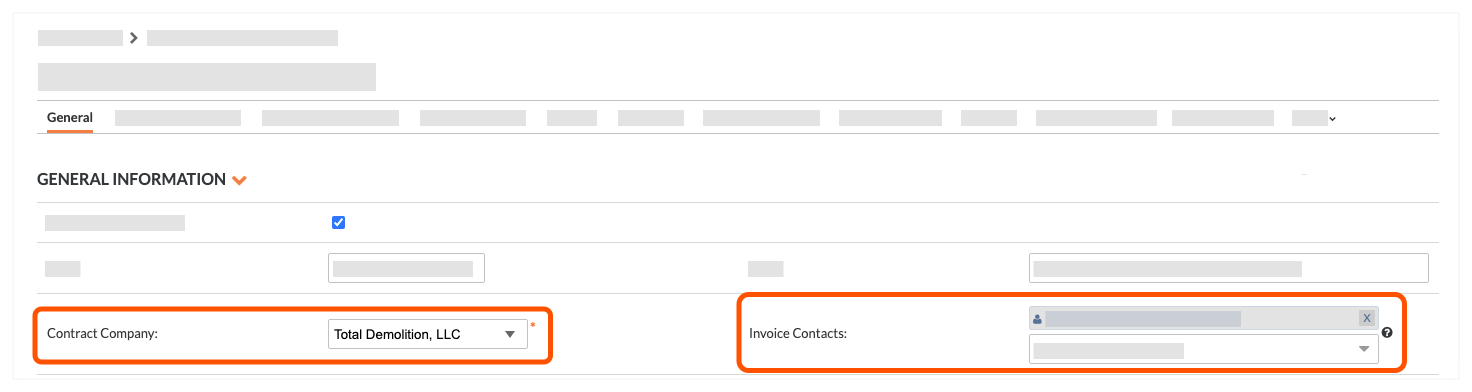
- Wenden Sie sich an das Unternehmen. Wählen Sie den Unternehmensdatensatz aus der Dropdown-Liste aus.
- Rechnungskontakte. Wählen Sie einen Mitarbeiter des Unternehmens aus dem Dropdown-Liste aus.
Tipps
- Sie finden nicht das richtige Unternehmen in der Liste "Kontaktunternehmen"? Der Unternehmensdatensatz muss dem Projektverzeichnis hinzugefügt werden. Siehe Hinzufügen eines Unternehmens zum Projektverzeichnis.
- Sie sehen den gewünschten Benutzer nicht in der Liste? Der Benutzer muss ein Mitarbeiter des Unternehmens sein, das im Projektverzeichnis eingetragen ist. Siehe Fügen Sie dem Projektverzeichnis ein Benutzerkonto hinzu.
- Klicken Sie auf Speichern.
Nächste Schritte
 .
.