Neue Zahlung zur Registerkarte „Geleistete Zahlungen“ eines Sekundärvertrags hinzufügen
Wichtig
Anmerkung des Autors: Protokollieren Sie alle Änderungen an der Rechnungsstellung und Zahlung in: https://procoretech.atlassian.net/browse/ILR-469PROCORE SUPPORT: INTERNE HINWEISE
Auf dieser Seite finden Sie Einzelheiten zur modernisierten Version des Kreditorenvertrags-Tools. Ein Tutorial für die Legacy-Version ist im Sekundärverträge-Tool unter diesem Link verfügbar: https://support.procore.com/products...n-a-commitment
For Procore Customers in the United States
 When your company applies the 'Owners English' or 'Specialty Contractors English' point-of-view dictionary, you'll see different tool names and term changes in the user interface. Learn how to apply the dictionary options.
- To learn the differences: Show/Hide
Ziel
So erfassen Sie alle Zahlungen, die Ihr Unternehmen für einen Sekundärvertrag glossary-of-terms#Commitmentausgibt, manuell als Rechnungsadministrator .
Hintergrund
Um alle Zahlungen, die an die Dateiname=""> Downstream-Projektmitarbeiter eines Sekundärvertrags geleistet wurden, manuell zu erfassen, verwenden Sie die <a title=" " href.path="//faq/what-is-a-downstream-collaborator" href.Registerkarte "Geleistete Zahlungen" auf dem Sekundärvertrag.
- Für Unternehmen, die Procore Pay verwenden: Einblenden/Ausblenden
- Informationen zu den Einstellungen, die erforderlich sind, um gemeinsame Scheckzahlungen bei der Verwendung von Procore Pay zur Zahlung von Subunternehmerrechnungen genau zu verfolgen und zu verwalten, finden Sie unter Über gemeinsame Schecks mit Procore Pay.
Wichtige Hinweise
Schritte
- Navigieren Sie zum Rechnungsstellungs-Tool des Projekts.
- Klicken Sie auf die Registerkarte Subunternehmer.
- Suchen Sie den Vertrag oder die Rechnung für den neuen Zahlungsdatensatz.
- Wählen Sie aus diesen Optionen, um den Sekundärvertrag zu öffnen.
- Vertrag. Klicken Sie auf den Link Vertrag , um den Kreditorenvertrag zu öffnen.
- Rechnung #. Klicken Sie auf den Link Rechnung # und dann auf den Link Vertrag # Breadcrumb.
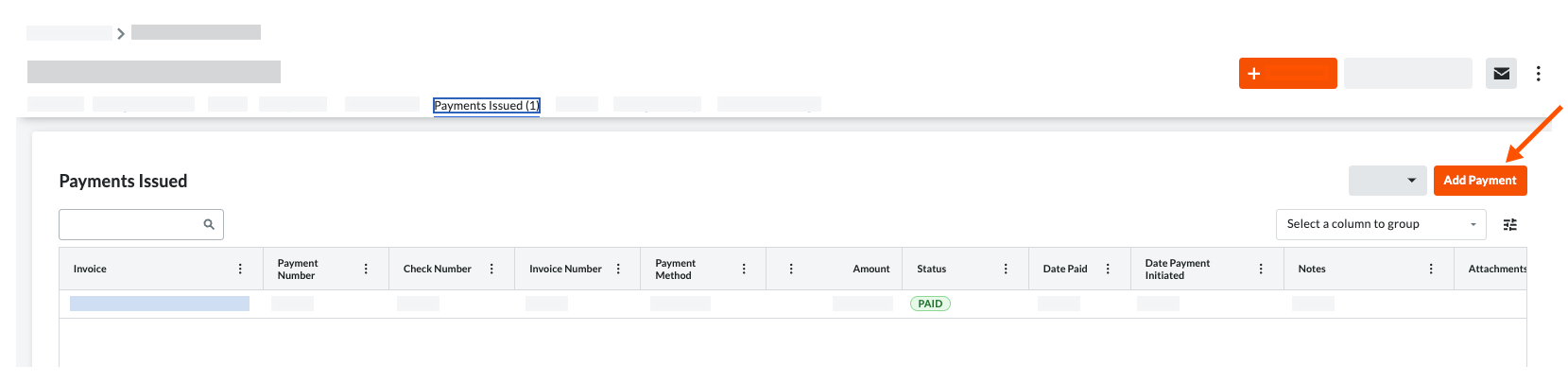
- Klicken Sie im Sekundärvertrag auf die Registerkarte Ausgestellte Zahlungen.
- Klicken Sie auf Zahlung hinzufügen.
- Geben Sie in die Eingabeaufforderung Zahlung hinzufügen Folgendes ein:
- Rechnung. Wählen Sie eine vorhandene Rechnung aus der Dropdown-Liste aus, an die die ausgestellte Zahlung angehängt ist.
- Zahlung #. Geben Sie die entsprechende Zahlungsnummer für die ausgestellte Zahlung ein.
- Zahlungsmethode . Wählen Sie im Dropdown-Liste eine Zahlungsmethode aus: Scheck, Kreditkarte und Elektronisch.
- Menge. Geben Sie den Betrag der Zahlung ein.
- Datum. Geben Sie den Ausgabedatum für die Zahlung ein
- Rechnung #. Geben Sie die entsprechende Rechnungsnummer für die ausgestellte Zahlung ein.
- Überprüfen Sie #. Geben Sie die entsprechende Schecknummer für die ausgestellte Zahlung ein.
- Notizen. Geben Sie zu Aufzeichnungszwecken etwaige zusätzliche Anmerkungen zur ausgestellten Zahlung ein.
- Anhängsel. Fügen Sie alle relevanten Dateien oder Dokumente bei.
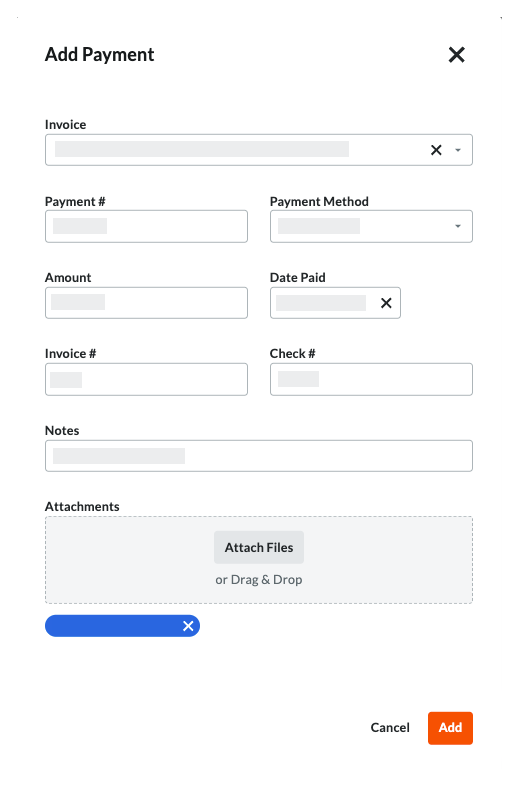
- Klicken Sie auf Hinzufügen.
 .
.