

Anzeigen und Filtern von Momentaufnahmen im Tool "Projektstatus-Momentaufnahmen"
Hintergrund
Mit dem Tool Projektstatus-Momentaufnahmen können Benutzer Momentaufnahmen aus den Procore-Projekten Ihres Unternehmens anzeigen, filtern und öffnen.
Wichtige Hinweise
-
Erforderliche Benutzerberechtigungen:
-
Um alle Projekt-Status-Momentaufnahmen anzuzeigen, Berechtigung "Schreibgeschützt" oder höher im Projektstatus-Momentaufnahmen-Tool.
-
Benutzer benötigen außerdem "Schreibgeschützt" oder eine höhere Berechtigung im Budget -Tool, um den Momentaufnahme sehen zu können.
-
-
Um den Status eines Projektstatus-Momentaufnahmen-Snapshot zu ändern oder eine Momentaufnahme-Liste zu exportieren, Berechtigung "Schreibgeschützt" oder höher im Tool "Projektstatus-Momentaufnahmen".
-
Schritte
-
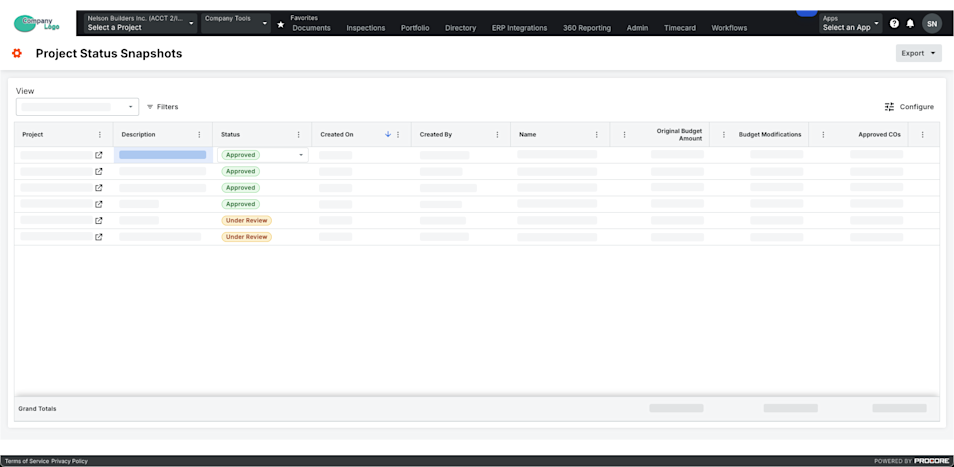
Navigieren Sie zum Tool Projektstatus-Momentaufnahmen auf Unternehmensebene.
-
Suchen Sie eine Momentaufnahme in der Liste.
Hinweis: Wenn Sie die Momentaufnahme anzeigen möchten, klicken Sie auf das Symbol Öffnen in der Spalte Projekt .
Wichtig
Um den Status des Projekts in bestimmten Procore-Projekten und ihre eigenen Ad-hoc-Momentaufnahmen zu sehen, gewähren Sie Benutzern Zugriff auf die Budget-Tools in diesen Projekten.
-
 (Optional) Filtern Sie nach Zeitraum oder Vergleichszeitraum:
-
Punkt. Wählen Sie einen oder mehrere Zeiträume aus dieser Dropdown-Liste aus.
Hinweis
- Sie können aus Optionen wie "Aktuell", "Letzter Zeitraum", "Keine" oder bestimmten Finanzzeiträumen wählen.
- Standard ist der aktuelle Zeitraum ausgewählt, bis er geändert wird.
-
Vergleichszeitraum. Wählen Sie aus dieser Dropdown-Liste einen Zeitraum aus, der mit dem Hauptzeitraum verglichen werden soll. Siehe Analysieren der Abweichung zwischen Momentaufnahmen im Projektstatus-Momentaufnahmen-Tool.
Hinweis
- Sie können aus Optionen wie "Aktuell", " Vorherige" oder "Bestimmte Finanzperioden" wählen.
- Wenn Sie die Option Vorheriger aus der Dropdown-Liste Vergleichszeitraum auswählen, wird der vorherige Zeitraum automatisch auf der Grundlage des aktuell in der Dropdown-Liste Zeitraum ausgewählten Zeitraums ausgewählt.
- Standard ist der vorherige Zeitraum ausgewählt, bis er geändert wird.
Wichtig
Die Felder Zeitraum und Vergleichszeitraum sind nur verfügbar, wenn die Einstellung Finanzzeiträume aktiviert ist. Siehe Aktivieren oder Deaktivieren von Finanzzeiträumen für Projektstatus-Momentaufnahmen.
-
-
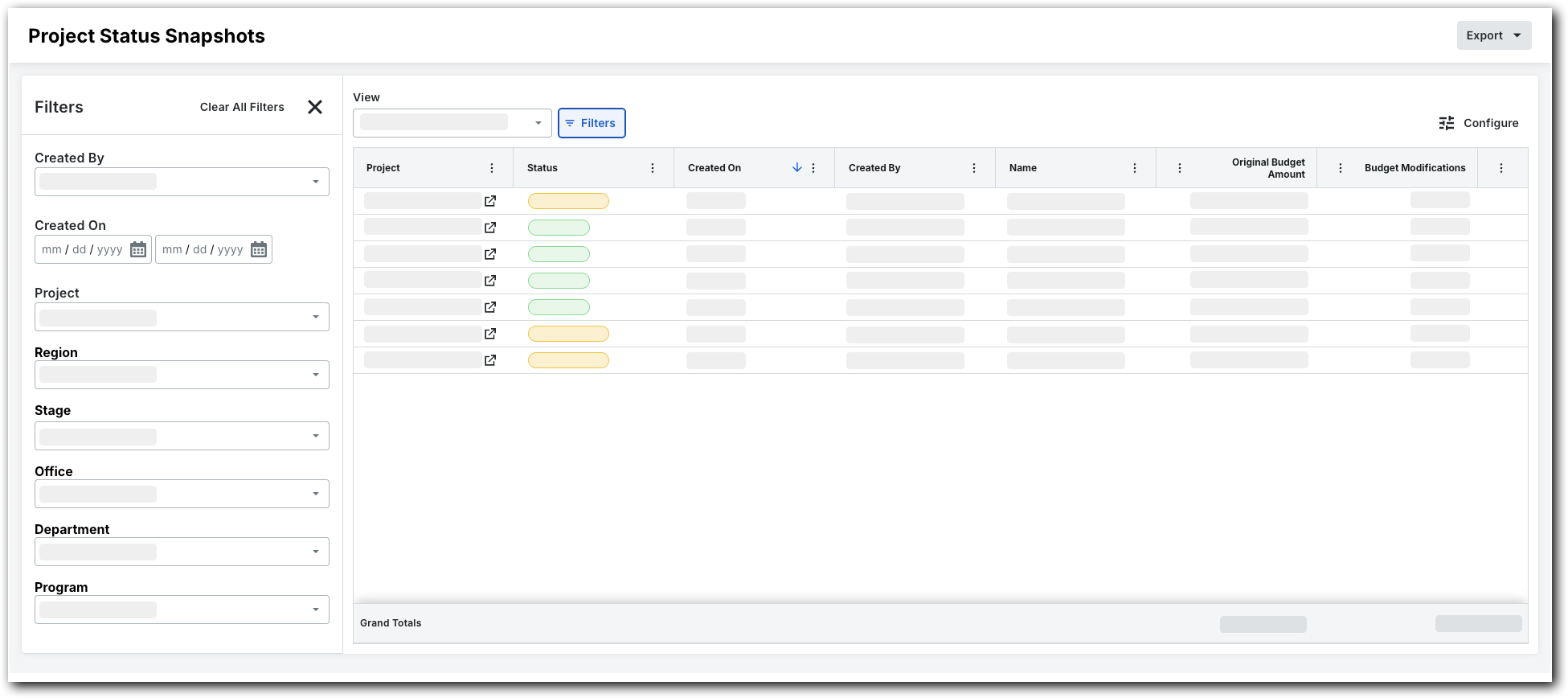
Um die Listenansicht zu filtern, klicken Sie auf Filter.
Dadurch wird das Fenster "Filter" geöffnet.
-
Legen Sie die verfügbaren Filter so fest, dass sie sich auf die Momentaufnahmen konzentrieren, die Sie anzeigen möchten. Folgende Filteroptionen stehen zur Verfügung:
-
Erstellt von. Wählen Sie einen oder mehrere Momentaufnahme-Ersteller aus.
-
Erstellt am. Legen Sie mithilfe des Kalenders einen Zeitrahmen fest.
-
Projekt. Wählen Sie bestimmte Projekte aus, um ihre Momentaufnahmen anzuzeigen.
-
Region. Wählen Sie eine Projektregion aus.
-
Phase. Wählen Sie eine Projektphase.
-
Status. Wählen Sie eine benutzerdefiniert Status aus. Ausführliche Informationen zum Erstellen eines benutzerdefiniert Status finden Sie unter Erstellen eines benutzerdefinierten Status für Projektstatus-Momentaufnahmen.
-
Büro. Wählen Sie ein Büro aus.
-
Abteilung. Wählen Sie eine Abteilung aus.
-
Programm. Wählen Sie ein Programm aus.
-